
ArbitraryNumberImputer#
The ArbitraryNumberImputer() replaces missing data with an arbitrary numerical
value determined by the user. It works only with numerical variables.
The ArbitraryNumberImputer() can find and impute all numerical variables
automatically. Alternatively, you can pass a list of the variables you want to impute
to the variables parameter.
You can impute all variables with the same number, in which case you need to define
the variables to impute in the variables parameter and the imputation number in
arbitrary_number parameter. For example, you can impute varA and varB with 99
like this:
transformer = ArbitraryNumberImputer(
        variables = ['varA', 'varB'],
        arbitrary_number = 99
        )

Xt = transformer.fit_transform(X)
You can also impute different variables with different numbers. To do this, you need to
pass a dictionary with the variable names and the numbers to use for their imputation
to the imputer_dict parameter. For example, you can impute varA with 1 and varB
with 99 like this:
transformer = ArbitraryNumberImputer(
        imputer_dict = {'varA' : 1, 'varB': 99}
        )

Xt = transformer.fit_transform(X)
Python implementation#
Below a code example using the house prices dataset.
First, let’s load the data and separate it into train and test:
import matplotlib.pyplot as plt
from sklearn.datasets import fetch_openml
from sklearn.model_selection import train_test_split

from feature_engine.imputation import ArbitraryNumberImputer

# Load dataset
X, y = fetch_openml(
    name='house_prices',
    version=1,
    return_X_y=True,
    as_frame=True,
    parser='auto',
)

# Separate into train and test sets
X_train, X_test, y_train, y_test = train_test_split(
    X,
    y,
    test_size=0.3,
    random_state=0,
)
Now we set up the ArbitraryNumberImputer() to impute 2 variables from the
dataset with the number -999:
# set up the imputer
arbitrary_imputer = ArbitraryNumberImputer(
    arbitrary_number=-999,
    variables=['LotFrontage', 'MasVnrArea'],
    )

# fit the imputer
arbitrary_imputer.fit(X_train)
With fit(), the transformer does not learn any parameter. It just assigns the imputation
values to each variable, which can be found in the attribute imputer_dict_.
With transform, we replace the missing data with the arbitrary values both in train and test sets:
# transform the data
train_t = arbitrary_imputer.transform(X_train)
test_t = arbitrary_imputer.transform(X_test)
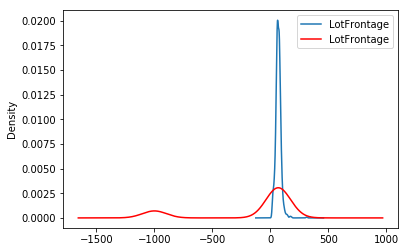
Note that after the imputation, if the percentage of missing values is relatively large, the variable distribution will differ from the original one.
Let’s create a density plot to observe the change in the distribution:
fig = plt.figure()
ax = fig.add_subplot(111)
X_train['LotFrontage'].plot(kind='kde', ax=ax)
train_t['LotFrontage'].plot(kind='kde', ax=ax, color='red')
lines, labels = ax.get_legend_handles_labels()
ax.legend(lines, labels, loc='best')
In the following image, we see the distribution of LotFrontage before and after the imputation (in red the imputed variable):
Additional resources#
For tutorials about missing data imputation methods check out these resources:
Feature Engineering for Machine Learning, online course.
Feature Engineering for Time Series Forecasting, online course.
Both our book and courses are suitable for beginners and more advanced data scientists alike. By purchasing them you are supporting Sole, the main developer of Feature-engine.